My Home Assistant Setup
I'd always had aspirations for a smart home, ever since renting a flat I had a few Philips Hue bulbs. But it was when moving to our home with my wife in Edinburgh that I put some effort into it. Initially it was only Philips Hue smart lighting. We love the ambiance and control, and we've even got those neat plates that cover the old physical switches (here's an example), making the Hue dimmer switches the primary control. I changed every light in the house within a few months.
Other than some automations for outside lights, and being able to make the lights pretty colours it wasn't really "smart" and this is what we had for 5 years
It was only a few months ago I really started to tinker with Home Assistant, I'd toyed with Homey Pro having believed that Home Assistant would require too much tinkering, but the high initial outlay of Homey caused me to try a Docker container with Home Assistant - and what a rabbit hole it's been.
I found inspiration and guidance with my automation config by reading others examples, so I've tried to include examples of mine. So, grab a cup of tea, and I'll dive into some of my favourite automations!
Contents
Kids TV control
This is a real hit with our kids! I've recessed an NFC reader into the wall below our TV. They have a collection of laminated cards each with an NFC tag within - when they tap one a short video plays on the TV (generally something from Cocomelon or another nursery rhyme). Home Assistant keeps a count of how many times each card has been played. There are also controls in our Home Assistant dashboard for my wife and me to disable the feature, override what's playing, or toggle whether they need to wait for one video to finish before starting another. It's a fun, interactive way for them to choose their content.
Technically
This was achieved using an ESP32 with a PN532 NFC module. I have these within a drywall backbox which was no longer being used, I already had a CAT6 cable to this outlet, so I got a POE splitter so I could power the ESP32 easily.
ESPHome config on the ESP32
wifi:
  fast_connect: true
  networks:
    - ssid: {MY_SSID}
      password: {MY_PASSWORD}
      hidden: true

esp32:
  board: esp32dev

esphome:
  name: tagreader
  name_add_mac_suffix: true

logger:

api:

i2c:
  scan: False
  frequency: 400kHz

pn532_i2c:
  update_interval: 0.5s
  on_tag:
    then:
      - homeassistant.tag_scanned: !lambda 'return x;'
      - text_sensor.template.publish:
          id: last_tag
          state: !lambda 'return x;'

text_sensor:
  - platform: version
    hide_timestamp: true
    name: Tag Reader ESPHome Version
    entity_category: diagnostic
  - platform: wifi_info
    ip_address:
      name: Tag Reader IP Address
      icon: mdi:wifi
      entity_category: diagnostic
    ssid:
      name: Tag Reader Connected SSID
      icon: mdi:wifi-strength-2
      entity_category: diagnostic
  - platform: template
    name: Tag Reader Last NFC Tag
    id: last_tag
    icon: mdi:nfc
The Home Assistant automation essentially checks the NFC tag is registered to a file, that the file is able to be played, and then triggers a script to actually play the file on the TV.
Config for the automation
mode: single
alias: Play movie from tag
triggers:
  - event_type: tag_scanned
    trigger: event
    alias: NFC tag is scanned
conditions:
  - alias: Ignore if triggered recently
    condition: template
    value_template: >-
      {{ state_attr('automation.living_room_nfc_tag_scanned', 'last_triggered')
      is not none and (now().timestamp() -
      state_attr('automation.living_room_nfc_tag_scanned',
      'last_triggered').timestamp()) > 15 }}
actions:
  - variables:
      NFC_MAPPING:
        04-FC-A3-35-BF-2A-81:
          filename: baby-shark.mp4
        04-F8-A3-35-BF-2A-81:
          filename: the-wheels-on-the-bus-uk.mp4
        04-D6-D1-35-BF-2A-81:
          filename: baa-baa-black-sheep.mp4
        04-D7-AE-35-BF-2A-81:
          filename: heads-shoulders-knees-and-toes.mp4
        04-C4-C4-35-BF-2A-81:
          filename: sleeping-bunnies.mp4
  - alias: Check for valid NFC tag
    if:
      - condition: template
        value_template: "{{ trigger.event.data.tag_id in NFC_MAPPING }}"
    else:
      - stop: Not valid NFC tag
        error: false
  - alias: Check whether the feature is enabled
    if:
      - condition: template
        value_template: "{{ states('input_boolean.living_room_nfc_reader_toggle') != 'on' }}"
    then:
      - stop: Feature is disabled
        error: false
  - alias: Check whether the children are being made to wait
    if:
      - condition: template
        value_template: >-
          {{ states('input_boolean.living_room_nfc_reader_wait') == 'on' and
          states('media_player.living_room_tv') == 'playing' and
          state_attr('media_player.living_room_tv', 'media_content_id') is not
          none and ('http://192.168.1.50:8081' in
          state_attr('media_player.living_room_tv', 'media_content_id')) }}
    then:
      - stop: Children are being made to wait
        error: false
  - alias: Check whether the same card is already playing
    if:
      - condition: template
        value_template: >-
          {{ states('media_player.living_room_tv') == 'playing' and
          state_attr('media_player.living_room_tv', 'media_title') ==
          NFC_MAPPING[trigger.event.data.tag_id].name }}
    then:
      - stop: Same card is already playing
        error: false
  - alias: Play file
    action: script.play_file
    data:
      filename: "{{ NFC_MAPPING[trigger.event.data.tag_id].filename }}"
The reason there is a specific script to play the file is because there are a few steps, and I do this from the automation but also from buttons on a dashboard which allow me to override what's playing.
Config for the play_file script
mode: single
alias: Play file
fields:
  filename:
    name: Filename
    required: true
    description: The filename to play
    example: baby-shark.mp4
    selector:
      select:
        options:
          - baby-shark.mp4
          - the-wheels-on-the-bus-uk.mp4
          - baa-baa-black-sheep.mp4
          - heads-shoulders-knees-and-toes.mp4
          - sleeping-bunnies.mp4
sequence:
  - variables:
      ENDPOINT: "http://192.168.1.50:8081"
      MAPPING:
        baby-shark.mp4:
          name: Baby Shark
          counter: play_baby_shark
        the-wheels-on-the-bus-uk.mp4:
          name: Wheels on the Bus (UK)
          counter: play_wheels_on_the_bus_uk
        baa-baa-black-sheep.mp4:
          name: Baa Baa Black Sheep
          counter: play_baa_baa_black_sheep
        heads-shoulders-knees-and-toes.mp4:
          name: Heads Shoulders Knees and Toes
          counter: play_heads_shoulders_knees_and_toes
        sleeping-bunnies.mp4:
          name: Sleeping Bunnies
          counter: play_sleeping_bunnies
  - action: script.turn_on
    target:
      entity_id: script.prepare_tv_to_play
  - action: media_player.play_media
    target:
      device_id: 252228ef0ecb6f8dcc4e04ef4b04c33c
    data:
      media_content_type: video
      media_content_id: "{{ ENDPOINT }}/{{ filename }}"
      extra:
        metadata:
          title: "{{ MAPPING[filename].name }}"
    alias: Start playing video
  - alias: Count watch
    action: counter.increment
    target:
      entity_id: counter.{{ MAPPING[filename].counter }}
Heating
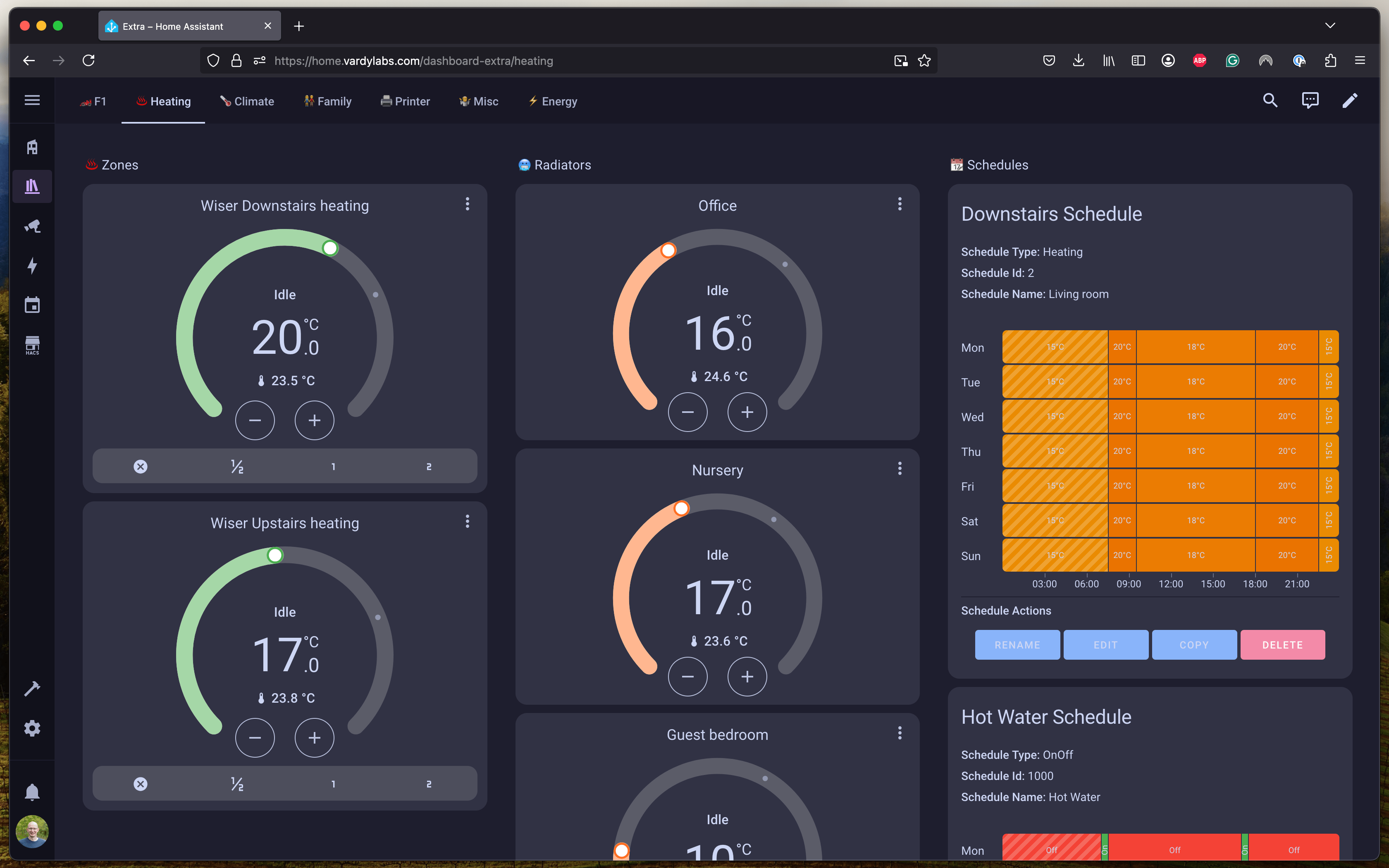
We've got a Drayton Wiser system controlling our main heating zones (upstairs, downstairs, and hot water). Home Assistant integrates with this, but we've also added a few Sonoff TRVs in specific rooms for even more granular control. This will likely change when we come into the cooler months, for now the heating doesn't really get used (but having heating we could turn on remotely has been a desire for a while)
Laundry
I've got an Athom smart plug v2 with power monitoring on both the washing machine and the dryer. Home Assistant knows when the washer has finished - it then sends reminds us to move the load to the dryer until it detects the dryer is running. Nice to also get cost breakdowns.

Technically
I'm using a brilliant blueprint, Appliance Notifications & Actions which does all the heavy lifting
The secret sauce here is that I have created a custom boolean
dryer_is_running and a template binary sensor washing_machine_has_been_emptied which has the template:
{{ states('input_boolean.dryer_is_running') == 'on' }}
effectively just converting the boolean to a binary value so the blueprint can use it. In the washer automation it will only send
reminders to empty the washer if
washing_machine_has_been_emptied is false.
Config for the washer automation
alias: Washer is running
use_blueprint:
  path: Blackshome/appliance-notifications.yaml
  input:
    power_sensor: sensor.athom_washer_plug_power
    start_title: Washer
    end_message_title: Washer
    end_notify_device:
      - {MY_PHONE}
      - {WIFES_PHONE}
    end_message: Yippee the washer has finished!
    include_power_tracking: enable_power_tracking_and_cost
    power_consumption_sensor: sensor.athom_washer_plug_energy
    end_message_cost: Approx Cost £
    include_duration_tracking: enable_duration_tracking
    include_end_notify: enable_end_notify_options
    cost_per_kwh: sensor.octopus_energy_electricity_xxxxxxxxxx_yyyyyyyyyyyyy_current_rate
    start_power_consumption: input_number.washer_start_number_helper
    end_power_consumption: input_number.washer_end_number_helper
    end_reminder_notification: enable_reminder_notification
    end_reminder_notification_entity: binary_sensor.washing_machine_has_been_emptied
    end_reminder_notification_message: Remember to put the washing in the dryer
    end_reminder_notification_max_count: 5
The dryer config sets the
input_boolean.dryer_is_running using custom actions in the blueprint.
Config for the dryer automation
alias: Dryer is running
use_blueprint:
  path: Blackshome/appliance-notifications.yaml
  input:
    power_sensor: sensor.athom_dryer_plug_power
    start_title: Dryer
    end_message_title: Dryer
    end_notify_device:
      - {MY_PHONE}
      - {WIFES_PHONE}
    end_message: The dryer has finished
    include_power_tracking: enable_power_tracking_and_cost
    power_consumption_sensor: sensor.athom_dryer_plug_energy
    end_message_cost: Approx Cost £
    include_duration_tracking: enable_duration_tracking
    include_end_notify: enable_end_notify_options
    cost_per_kwh: sensor.octopus_energy_electricity_xxxxxxxxxx_yyyyyyyyyyyyy_current_rate
    start_power_consumption: input_number.dryer_start_number_helper
    end_power_consumption: input_number.dryer_end_number_helper
    include_custom_actions:
      - enable_start_custom_actions
      - enable_end_custom_actions
    start_custom_actions:
      - action: input_boolean.turn_on
        target:
          entity_id: input_boolean.dryer_is_running
    end_custom_actions:
      - action: input_boolean.turn_off
        target:
          entity_id: input_boolean.dryer_is_running
Garage
One of the home improvements the past few months was to get a new garage door, naturally I wanted to be able to control this with Home Assistant, but I also added some sensors and controls to the garage too
- As soon as the garage door opens, the lights turn on
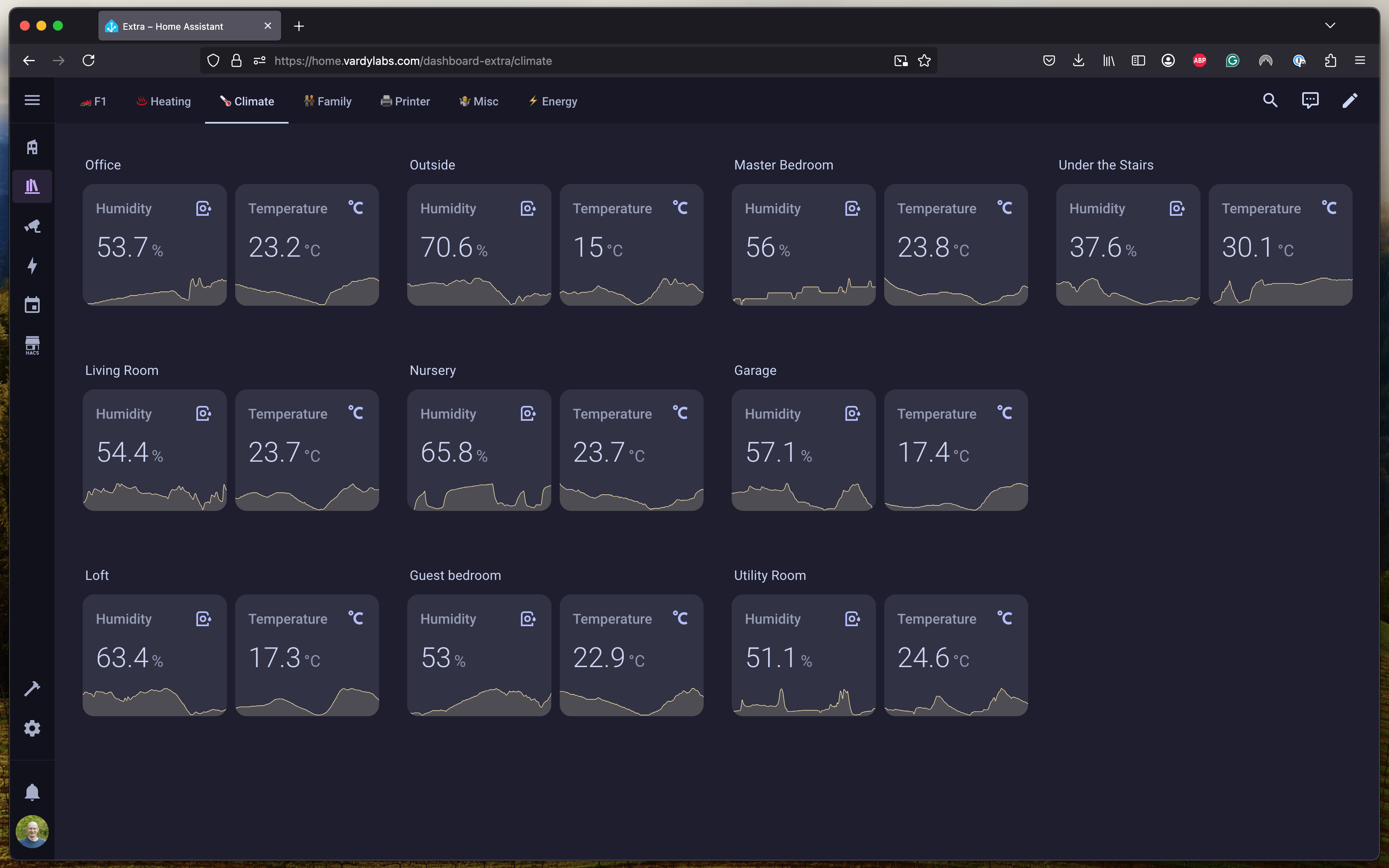
- A temperature and humidity monitor in the garage and a smart plug on the dehumidifier - so it's a fairly simple automation to get the dehumidifier running only when we need it. Power monitoring on the dehumidifier too because those things can add up
- If the garage door is open for more than 30 minutes, I get a friendly nudge on my phone. Holding on it gives me the option to close the door remotely.
Technically
I went for a Somfy IO drive motor with a SeceuroGlide Garage Door. This required me to get a Somfy Connectivity Kit which would allow me to control the door remotely and integrate it with Home Assistant. But if I'm being honest it's not ideal, when you control the door with the Somfy remote it doesn't report that status back to Home Assistant so I ended up using door contact sensors on the door and a custom cover configured in Home Assistant. I've also found the connection to be quite unreliable. If I was going to do this again I would get a drive motor with regular "dry contacts" and control it with ESPHome (probably this garage door opener from Athom Tech)
For the light control we had LED battons already installed and I couldn't justify changing them just for automations so I added a SONOFF ZBMINIR2 in line with the light switch, so the lights can be controlled through Home Assistant, but there is also a mechanical switch in there just like before.
Config for garage open automation
Interesting point here is that I have a check so if both me and my wife are away from home and the garage is opened we will get a notification for a possible break in.
alias: Garage open
mode: single
triggers:
  - trigger: state
    entity_id:
      - cover.garage_door_cover
    to: open
actions:
  - type: turn_on
    device_id: xxxxxxxxxx
    domain: switch
  - alias: Check whether it might be a break in
    if:
      - alias: Both Joel and Rachel are away
        condition: and
        conditions:
          - condition: state
            entity_id: person.joel_vardy
            state: not_home
          - condition: state
            entity_id: person.rachel_vardy
            state: not_home
    then:
      - alias: Notify Joel
        action: notify.mobile_app_joels_iphone_16_pro
        data:
          message: Possible garage break in!
      - alias: Notify Rachel
        action: notify.mobile_app_rachels_iphone
        data:
          message: Possible garage break in!
  - type: turn_off
    alias: Turn off dehumidifier
    device_id: xxxxxxxxxx
    domain: switch
When the garage is left open for more than 30 minutes I get a notification on my phone
Garage left open notification
I'm using the contact sensor blueprint from Malte which makes the notification very simple. My automation config is below:
alias: Notify garage is left open
use_blueprint:
  path: Raukze/contact-sensor-left-open-notification.yaml
  input:
    trigger_entity: binary_sensor.garage_door_contact
    friendly_name: Garage door
    duration_issue_state:
      hours: 0
      minutes: 30
      seconds: 0
      days: 0
    duration_from_issue_state:
      hours: 0
      minutes: 0
      seconds: 10
      days: 0
    notify_services_string: notify.mobile_app_joels_iphone_16_pro
    notification_click_url: /dashboard-house/outside
    repeat_notification: false
    notification_interruption_level: time-sensitive
Office
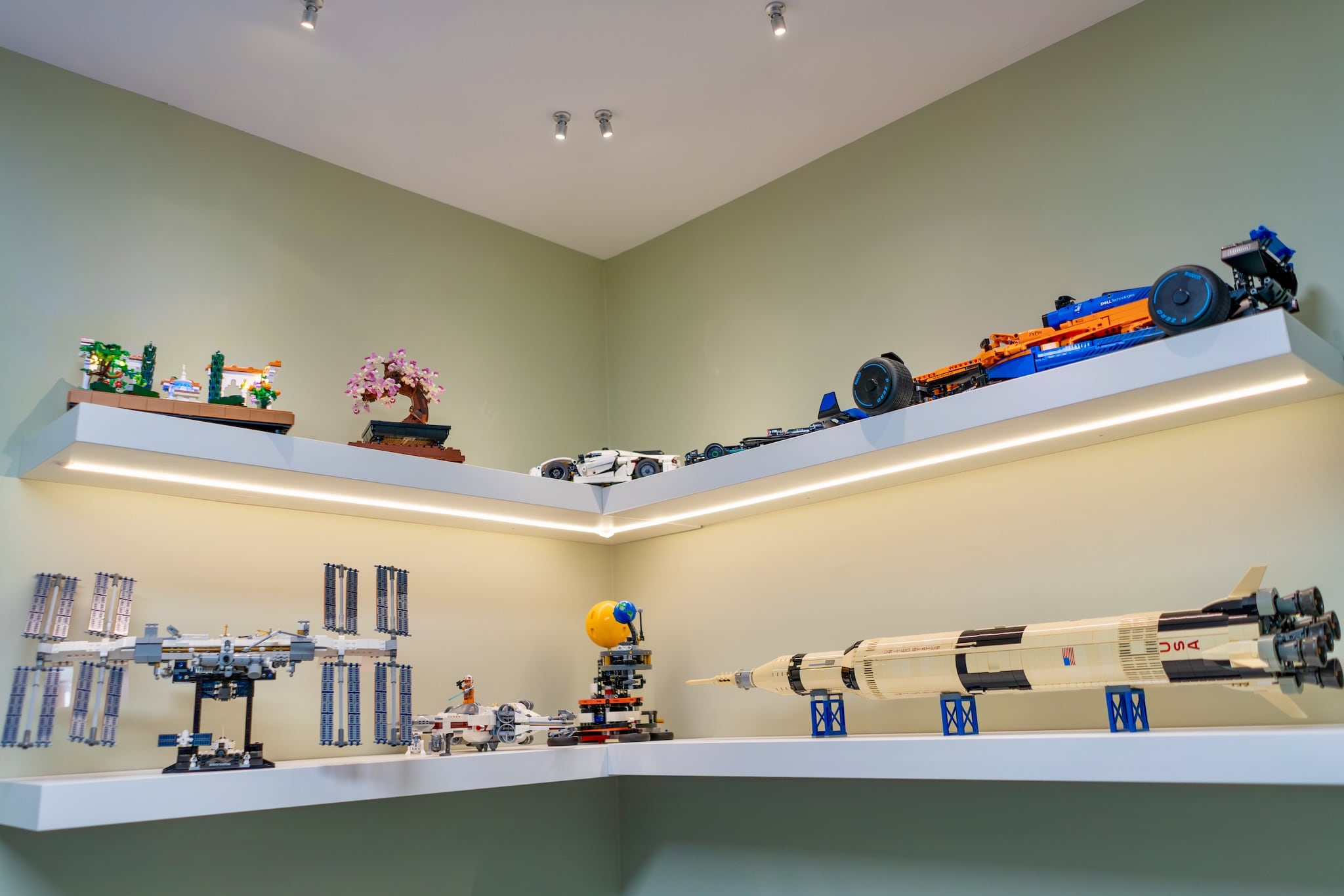
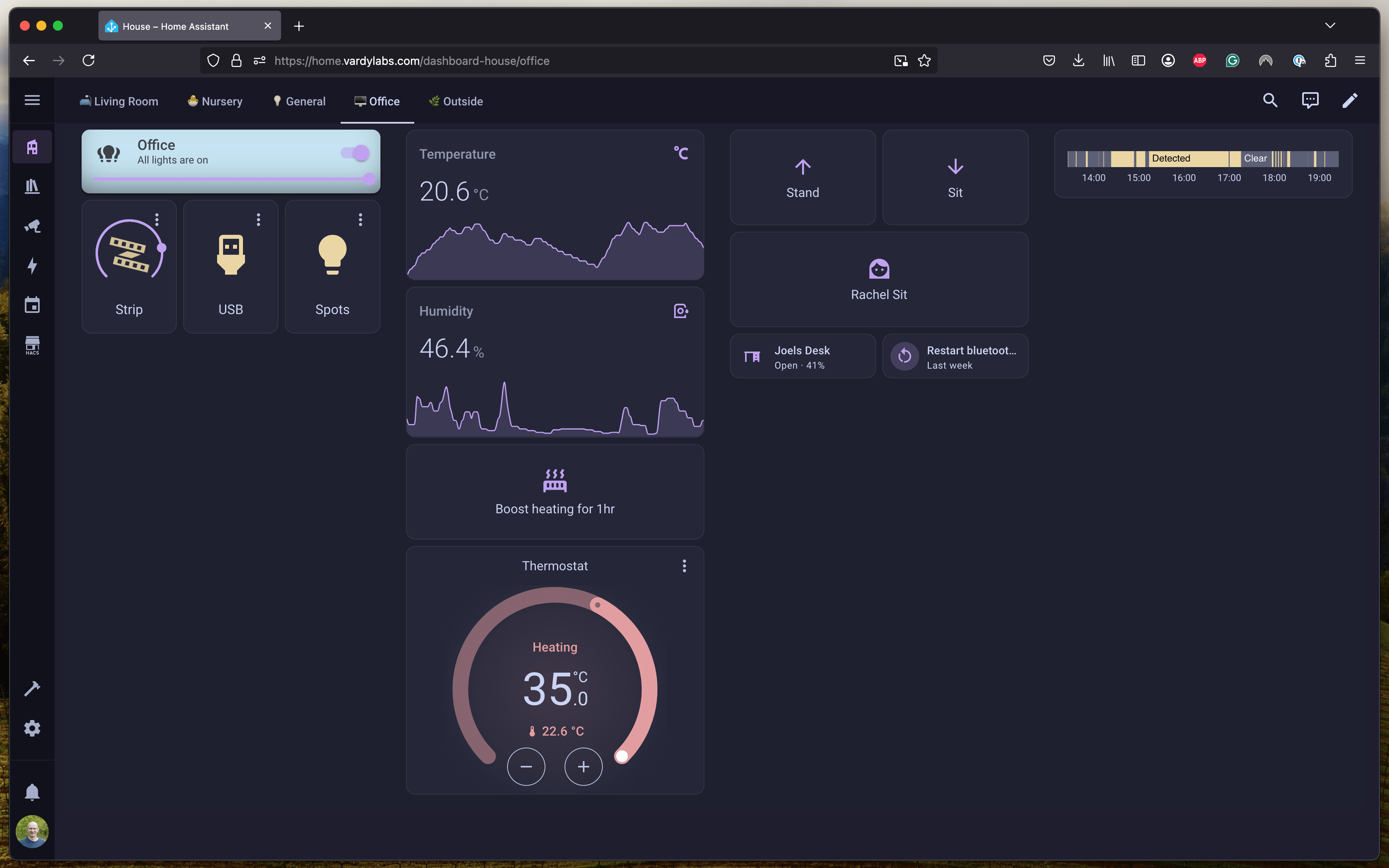
I have some custom shelves in my office, these are simple IKEA LACK shelves that I've modified to add integrated USB power for Lego light kits and light strips under the first shelf. I've also added some mini spots on the ceiling to light up the top shelf. For the USB power and the light strip I'm controlling these using an ESP32 running ESPHome, the ceiling spots are switched through a Sonoff relay.
Using a Sonoff presence detector, all the office lights automatically turn on when someone enters between 8 am and 6 pm on weekdays. Walk in, lights on. Walk out, lights off.
My IKEA sit-stand desk doesn't have a memory function but I've integrated it into Home Assistant via a Bluetooth proxy, so now I have a quick button for my preferred heights for sit and stand
Lighting
Lighting plays a huge role in setting the mood and providing convenience throughout our home:
Technically
Config for the reminder to turn things off
alias: Did someone turn off the lights?
mode: single
triggers:
  - trigger: state
    entity_id:
      - person.joel_vardy
      - person.rachel_vardy
    to: not_home
conditions:
  - condition: state
    entity_id: person.joel_vardy
    state: not_home
  - condition: state
    entity_id: person.rachel_vardy
    state: not_home
  - condition: or
    alias: If anything has been left on
    conditions:
      - condition: state
        entity_id: light.house
        state: "on"
      - condition: state
        state: "on"
        entity_id: media_player.sony_xr_65a80j
        alias: If TV is on
actions:
  - action: script.turn_on
    target:
      entity_id: script.turn_house_off_notification
    alias: Send the turn off house notification
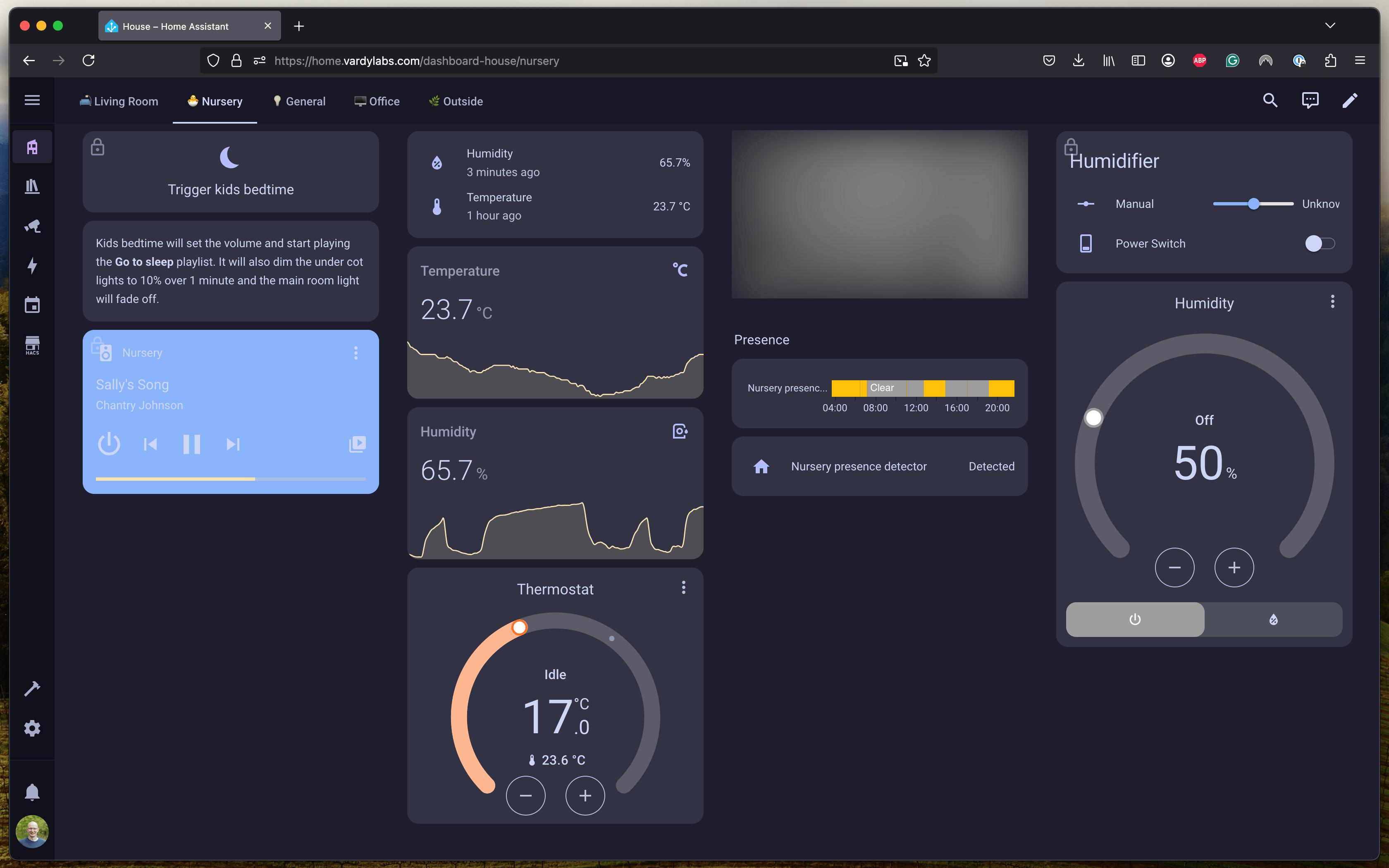
The Kids' Bedtime Routine
Getting the little ones to bed can be a process, we've always had white noise play in their room, and the past 6 months or so we've had a Spotify playlist we'd play at bedtime.
One of the problems with this is that depending who started playing the Spotify playlist one of us couldn't use Spotify for a few hours until we faded the music down to off, this was a pain as one of us would often go to the gym after bedtime.
- The routine: When we trigger the "bedtime routine” (after they're in pyjamas and having read a book), the lights in their room slowly fade down (over a minute or so), and their sleep playlist begins on the nursery speaker.
- Accident-Proof Controls: Once the routine is active and Home Assistant detects presence in the room the Home Assistant dashboard "locks out" the controls. To make any changes, you have to confirm your intention in the Home Assistant app. This prevents us accidentally making the lights brighter or the music louder, waking up one or both toddlers!
Technically
So solve the Spotify issue I tried a lot of things, but eventually settled on running Music Assistant alongside Home Assistant and I downloaded a new set of music for offline playback, we don't currently use Music Assistant for anything other than this bedtime playlist, but it's solved a big pain point
Config for the bedtime routine script
To fade the lights so gradually I'm using the light fader 2.0 blueprint by Ashley Bischoff
alias: Start bedtime
description: Dims the lights and starts the 'Go to sleep' playlist
icon: mdi:power-sleep
sequence:
  - parallel:
      - sequence:
          - action: media_player.volume_set
            data:
              volume_level: 0.45
            target:
              entity_id: media_player.nursery
          - action: media_player.shuffle_set
            data:
              shuffle: false
            target:
              entity_id: media_player.nursery
          - action: music_assistant.play_media
            target:
              entity_id: media_player.nursery
            data:
              media_type: playlist
              media_id: Go to sleep
              enqueue: replace
          - action: media_player.repeat_set
            data:
              repeat: all
            target:
              entity_id: media_player.nursery
        alias: Start playlist
      - action: script.turn_on
        alias: Fade ceiling light
        target:
          entity_id: script.light_fader
        data:
          variables:
            light: light.nursery_ceiling
            lampBrightnessScale: zeroToOneHundred
            transitionTime:
              hours: 0
              minutes: 0
              seconds: 20
            endBrightnessPercent: 0
            minimumStepDelayInMilliseconds: 100
      - action: script.turn_on
        alias: Fade cot left light
        target:
          entity_id: script.light_fader
        data:
          variables:
            light: light.nursery_cot_left
            lampBrightnessScale: zeroToOneHundred
            transitionTime:
              hours: 0
              minutes: 1
              seconds: 0
            endBrightnessPercent: 10
            minimumStepDelayInMilliseconds: 100
      - action: script.turn_on
        alias: Fade cot right light
        target:
          entity_id: script.light_fader
        data:
          variables:
            light: light.nursery_cot_right
            lampBrightnessScale: zeroToOneHundred
            transitionTime:
              hours: 0
              minutes: 1
              seconds: 0
            endBrightnessPercent: 10
            minimumStepDelayInMilliseconds: 100
In Home Display
I have a Samsung Galaxy Tab A9+ on a Makes by Mike mount where my downstairs heating thermostat used to be. This has a digital thermostat (although we have a physical Wiser one in the living room now too)
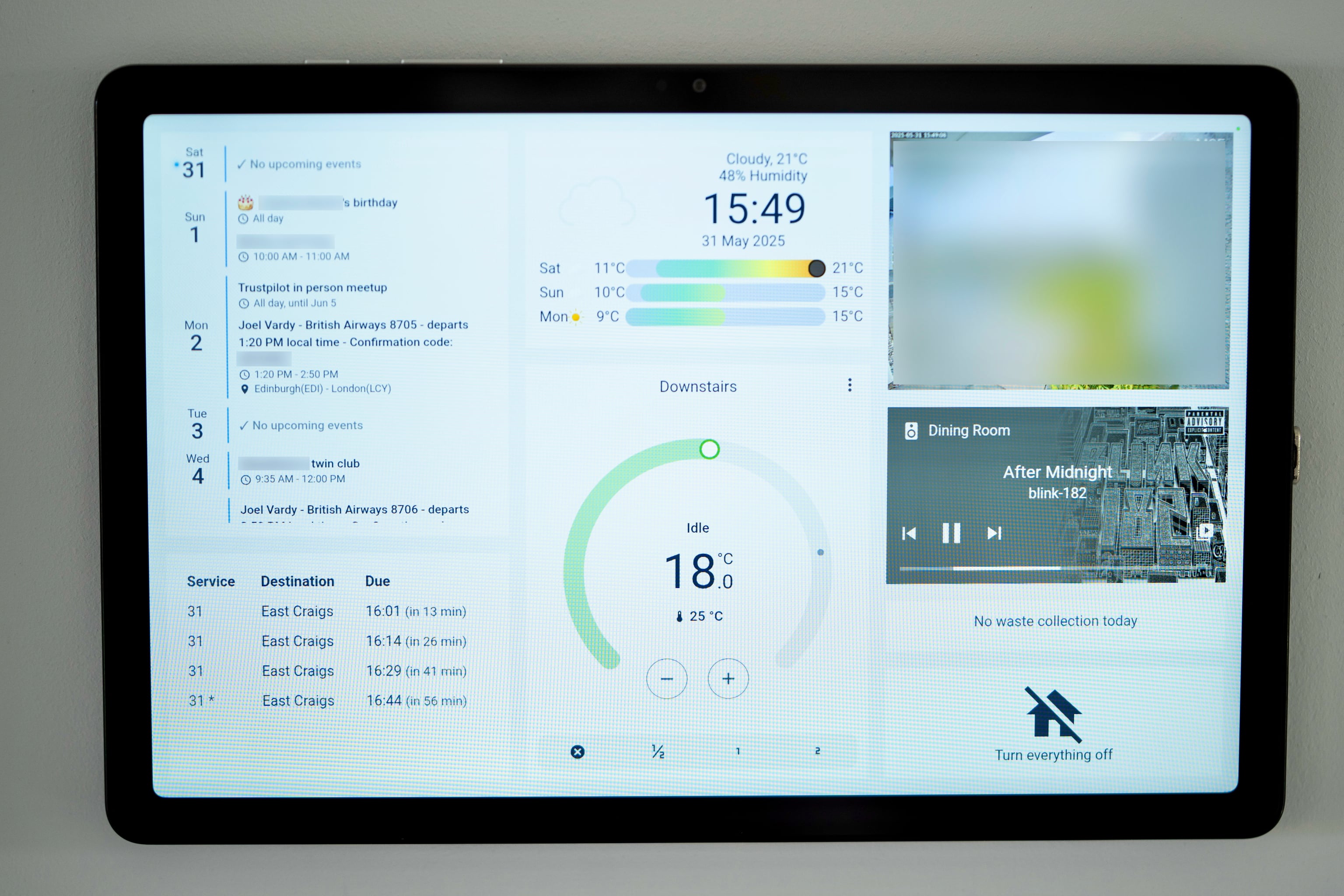
Wife approval factor on this has been quite high, I've setup live bus times, bin day reminders, music control, and shared calendars on here along with video feed from the front door, weather, and a button you can press when leaving the house which turns everything off
Technically
I'm using Fully Kiosk pointed at a custom dashboard which has Kiosk Mode which hides the Home Assistant header and sidebar
Config for the dashboard
For the dashboard design itself I resorted to placing cards on the custom:button-card as described in this article and video from yoyotech.
kiosk_mode:
  kiosk: true
views:
  - title: Home
    type: panel
    theme: Catppuccin Latte
    cards:
      - type: custom:button-card
        show_state: false
        tap_action:
          action: none
        custom_fields:
          calendar:
            card:
              entities:
                - entity: calendar.xxxxx
                - entity: calendar.yyyyy
                - entity: calendar.birthdays
                  label: 🎂
                - entity: calendar.holidays_in_united_kingdom
                  label: 🏖️
              days_to_show: 7
              show_empty_days: true
              today_indicator: glow
              show_month: false
              type: custom:calendar-card-pro
              height: 437px
          bus_times:
            card:
              type: custom:bus-times-card
              stop_id: xxxxxxxxxx
          weather:
            card:
              type: custom:clock-weather-card
              entity: weather.met_office_xx_yyyyyy_xx_yyyyyy
              temperature_sensor: sensor.outside_temperature_humidity_sensor_temperature
              humidity_sensor: sensor.outside_temperature_humidity_sensor_humidity
              time_pattern: HH:mm
              time_format: 24
              date_pattern: DDD
              show_humidity: true
          thermostat:
            card:
              type: thermostat
              show_current_as_primary: false
              entity: climate.wiser_downstairs_heating
              name: Downstairs
              features:
                - style: icons
                  type: climate-preset-modes
                  preset_modes:
                    - Cancel Overrides
                    - Boost 30m
                    - Boost 1h
                    - Boost 2h
          camera:
            card:
              type: custom:webrtc-camera
              url: rtsp://xxxxxxxxxx
              ui: true
              muted: true
              background: true
              style: '.screenshot, .pictureinpicture { display: none }'
          media_player:
            card:
              type: media-control
              entity: media_player.dining_room
          bin_day:
            card:
              type: markdown
              content: |-
                {% set today = (now() + timedelta(days=1)).date() %} {% set
                non_recyclable_dates = [
                  "2025-01-08", "2025-01-22",
                  "2025-02-05", "2025-02-19",
                  "2025-03-05", "2025-03-19",
                  "2025-04-02", "2025-04-16", "2025-04-30",
                  "2025-05-14", "2025-05-28",
                  "2025-06-11", "2025-06-25",
                  "2025-07-09", "2025-07-23",
                  "2025-08-06", "2025-08-20",
                  "2025-09-03", "2025-09-17",
                  "2025-10-01", "2025-10-15", "2025-10-29",
                  "2025-11-12", "2025-11-26",
                  "2025-12-10", "2025-12-24"
                ] %} {% set recyclable_dates = [
                  "2025-01-01", "2025-01-15", "2025-01-29",
                  "2025-02-12", "2025-02-26",
                  "2025-03-12", "2025-03-26",
                  "2025-04-09", "2025-04-23",
                  "2025-05-07", "2025-05-21",
                  "2025-06-04", "2025-06-18",
                  "2025-07-02", "2025-07-16", "2025-07-30",
                  "2025-08-13", "2025-08-27",
                  "2025-09-10", "2025-09-24",
                  "2025-10-08", "2025-10-22",
                  "2025-11-05", "2025-11-19",
                  "2025-12-03", "2025-12-17", "2025-12-31"
                ] %} {% if today|string in non_recyclable_dates %}
                  BIN DAY! Non-recyclable waste collection
                {% elif today|string in recyclable_dates %}
                  BIN DAY! Recyclable waste collection
                {% else %}
                  No waste collection today
                {% endif %}
          house_off:
            card:
              type: custom:button-card
              icon: mdi:home-off
              name: Turn everything off
              size: 20%
              tap_action:
                action: perform-action
                perform_action: script.turn_everything_off
        styles:
          card:
            - padding: 22px
            - align-self: start
            - width: 1280px
            - height: 799px
            - opacity: 1
            - background-color: transparent
            - border: thick
            - '--mdc-ripple-color': transparent
            - '--mdc-ripple-press-opacity': 0
            - cursor: default
          custom_fields:
            calendar:
              - position: absolute
              - top: 20px
              - left: 20px
              - width: 400px
              - height: 470px
              - text-align: left
            bus_times:
              - position: absolute
              - top: 510px
              - left: 20px
              - width: 400px
              - height: 269px
              - overflow-y: auto
              - background: var(--card-background-color)
            weather:
              - position: absolute
              - top: 20px
              - left: 440px
              - width: 400px
              - height: 250px
            thermostat:
              - position: absolute
              - top: 290px
              - left: 440px
              - width: 400px
              - height: 489px
            camera:
              - position: absolute
              - top: 20px
              - left: 860px
              - width: 400px
              - height: 300px
            media_player:
              - position: absolute
              - top: 340px
              - left: 860px
              - width: 400px
              - height: 208px
            bin_day:
              - position: absolute
              - top: 568px
              - left: 860px
              - width: 400px
              - height: 60px
              - justify-self: center
            house_off:
              - position: absolute
              - top: 648px
              - left: 860px
              - width: 400px
              - height: 131px
There was a card in the config above for
custom:bus-times-card this was my first attempt at a custom Lovelace card which shows bus times for my local bus stop
into Edinburgh.
Config for custom:bus-times-card
The code below is saved to
homeassistant/config/www/bus-times-card.js and then enabled as a custom resource in the Home Assistant UI
class BusTimesCard extends HTMLElement {
  constructor() {
    super();
    this.attachShadow({ mode: 'open' });
    this.interval = null;
    this.data = null;
    this.stopId = null;
    this.apiUrl = null;
  }

  setConfig(config) {
    this.config = config;
    this.stopId = config.stop_id || '6200239328';
    this.apiUrl = `https://lothianapi.co.uk/departureBoards/website?stops=${this.stopId}`;
    this.render();
    this.fetchData();
    if (this.interval) clearInterval(this.interval);
    this.interval = setInterval(() => this.fetchData(), 60000); // 1 minute
  }

  async fetchData() {
    try {
      const response = await fetch(this.apiUrl);
      if (!response.ok) throw new Error('Network response was not ok');
      this.data = await response.json();
      this.render();
    } catch (e) {
      this.data = null;
      this.renderError(e.message);
    }
  }

  render() {
    if (!this.shadowRoot) return;
    const style = `
      <style>
        :host {
          display: block;
          font-family: var(--primary-font-family);
          color: var(--primary-text-color);
        }
        ha-card {
          padding: 16px;
          background: var(--ha-card-background, white);
          box-shadow: var(--ha-card-box-shadow, 0 2px 4px rgba(0,0,0,0.16));
          border-radius: var(--ha-card-border-radius, 12px);
        }
        table {
          width: 100%;
          border-collapse: collapse;
        }
        th, td {
          padding: 8px;
          text-align: left;
        }
        th {
          color: var(--primary-text-color);
        }
        .delta {
          color: var(--secondary-text-color, #888);
          font-size: 90%;
        }
      </style>
    `;
    let content = '';
    const services = (this.data && this.data.services) ? this.data.services : [];
    let departures = services.flatMap(service => (service.departures || []).map(dep => ({
      ...dep,
      service_name: service.service_name
    })));
    departures = departures.sort((a, b) => new Date(a.departure_time_iso) - new Date(b.departure_time_iso));
    if (!departures.length) {
      content = '<div>No upcoming buses.</div>';
    } else {
      content = `
        <table>
          <thead>
            <tr>
              <th>Service</th>
              <th>Destination</th>
              <th>Due</th>
            </tr>
          </thead>
          <tbody>
            ${departures.map(bus => {
              const depTime = new Date(bus.departure_time_iso);
              const now = new Date();
              const diffMs = depTime - now;
              const diffMin = Math.round(diffMs / 60000);
              const timeStr = depTime.toLocaleTimeString([], { hour: '2-digit', minute: '2-digit' });
              const deltaStr = diffMin > 0 ? `in ${diffMin} min` : diffMin === 0 ? 'now' : `${-diffMin} min ago`;
              // Add asterisk if not real_time
              const needsAsterisk = !bus.real_time;
              return `
                <tr>
                  <td>${bus.service_name}${needsAsterisk ? ' *' : ''}</td>
                  <td>${bus.destination}</td>
                  <td>${timeStr} <span class="delta">(${deltaStr})</span></td>
                </tr>
              `;
            }).join('')}
          </tbody>
        </table>
      `;
    }
    this.shadowRoot.innerHTML = style + `<ha-card>${content}</ha-card>`;
  }

  renderError(message) {
    if (!this.shadowRoot) return;
    this.shadowRoot.innerHTML = `<div style="color:red;">Error: ${message}</div>`;
  }

  getCardSize() {
    return 3;
  }

  disconnectedCallback() {
    if (this.interval) clearInterval(this.interval);
  }
}

customElements.define('bus-times-card', BusTimesCard);

window.customCards = window.customCards || [];
window.customCards.push({
  type: 'bus-times-card',
  name: 'Bus Times Card',
  description: 'Shows a table of upcoming bus times for a given stop.',
});
For the physical mounting of the tablet I was able to get power from the old heating controls, from there I stepped it down from 240v to 5v for the USB input. Then hooked up the thin USB C cable which came with the mount.
The mounting
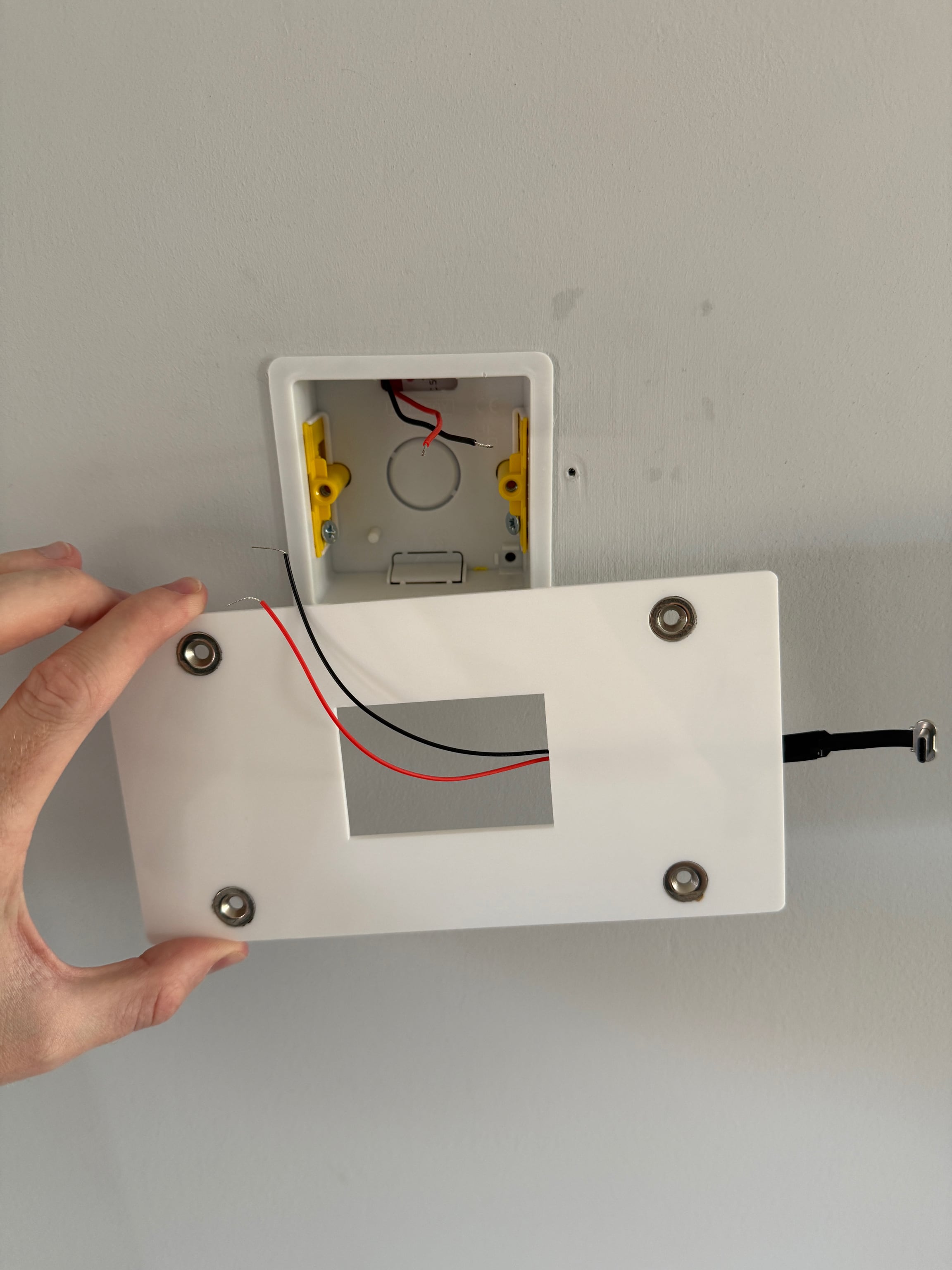
The screen turns off after 2 minutes, but is woken up when the tablet detects presence or when motion is detected in the kitchen or dining room via an automation
I'm currently using the default Galaxy Tab A9+ power management to keep the battery at around 80% charge to avoid it swelling. If this becomes a problem I'll probably install a relay on the power here and only turn the power on when the charge drops to 30% and then back off when it's at 90%
Energy Monitoring
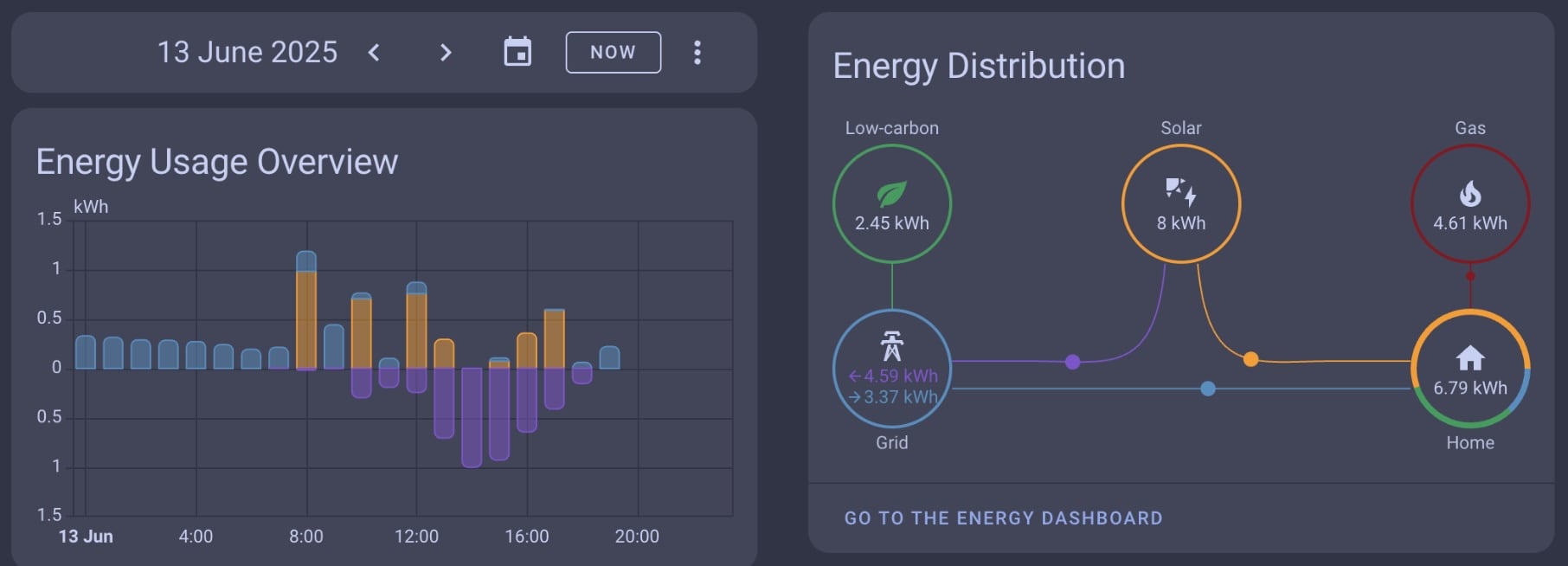
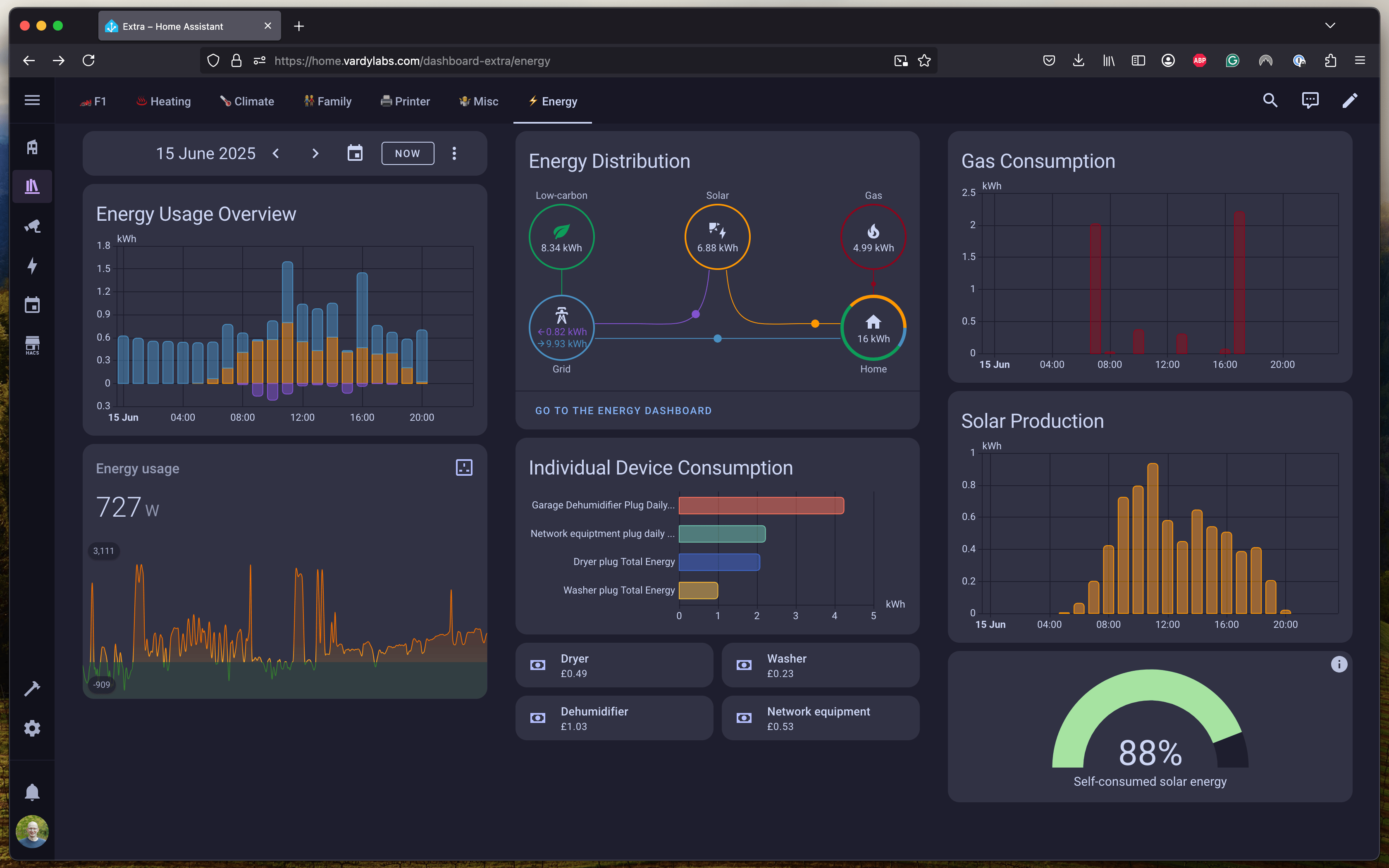
I've tried to understand by energy usage so I have monitoring on a few things:
- I have an Octopus Home Mini which allows me to see real time usage of my electricity and half hourly usage of my gas
- I have a Solis inverter on my solar panels and a data logger which is integrated into Home Assistant to see hourly solar production
- I also have a Shelly EM clam around my main incoming feed and around the feed from the solar inverter
- I have energy monitoring plugs on my:
- Washing machine
- Tumble dryer
- Dehumidifier
- Network equipment (this includes my NAS and cameras)
You might realise I have some duplication, I can see energy usage from Octopus and solar generation from my inverter so why do I need an energy monitor on top of that? Well the Octopus API doesn't expose export data, and I want to see how much of my solar usage is being used in the home vs exported back to the grid. And I wanted better resolution than the hourly data from my inverter.
Dashboards
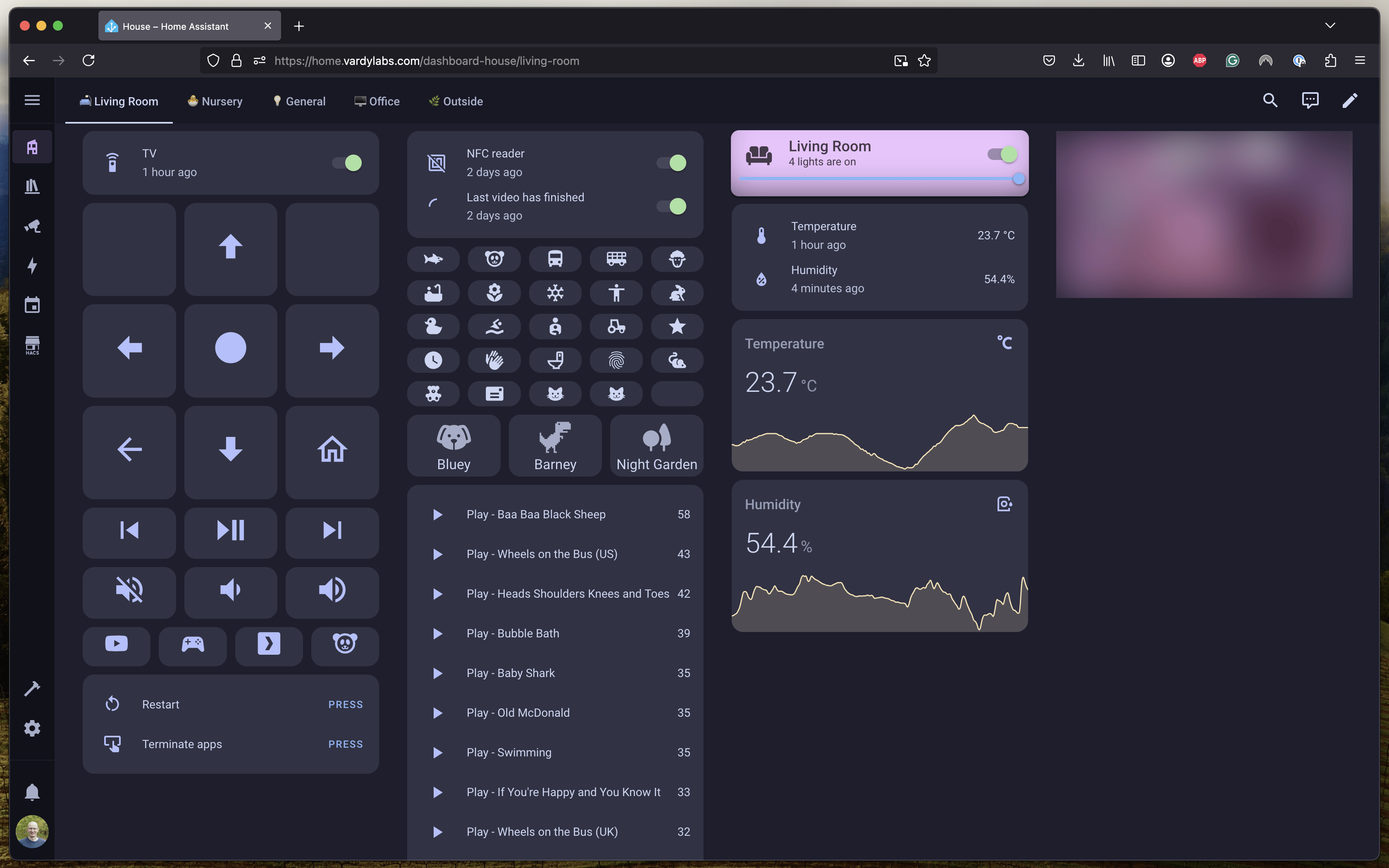
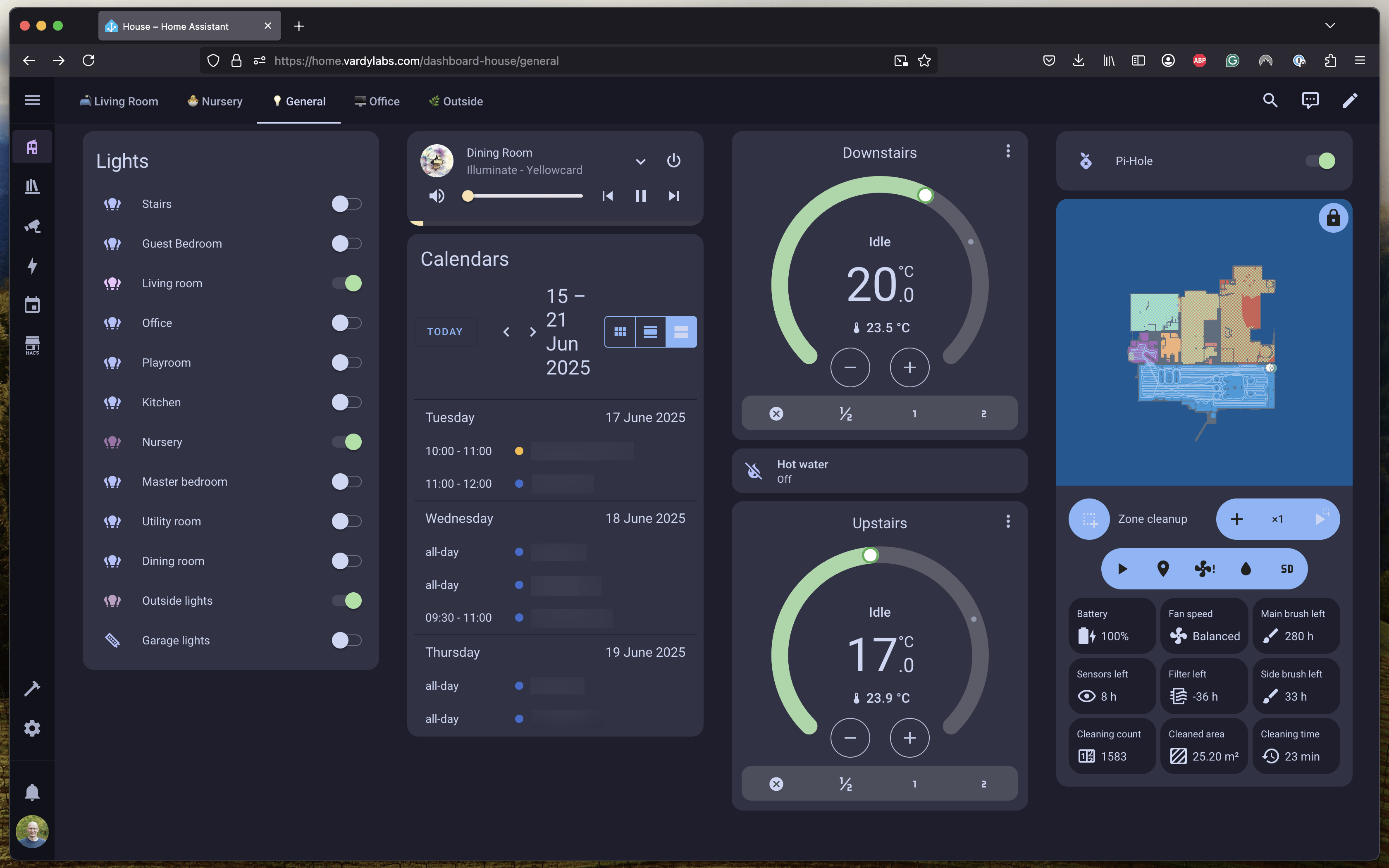
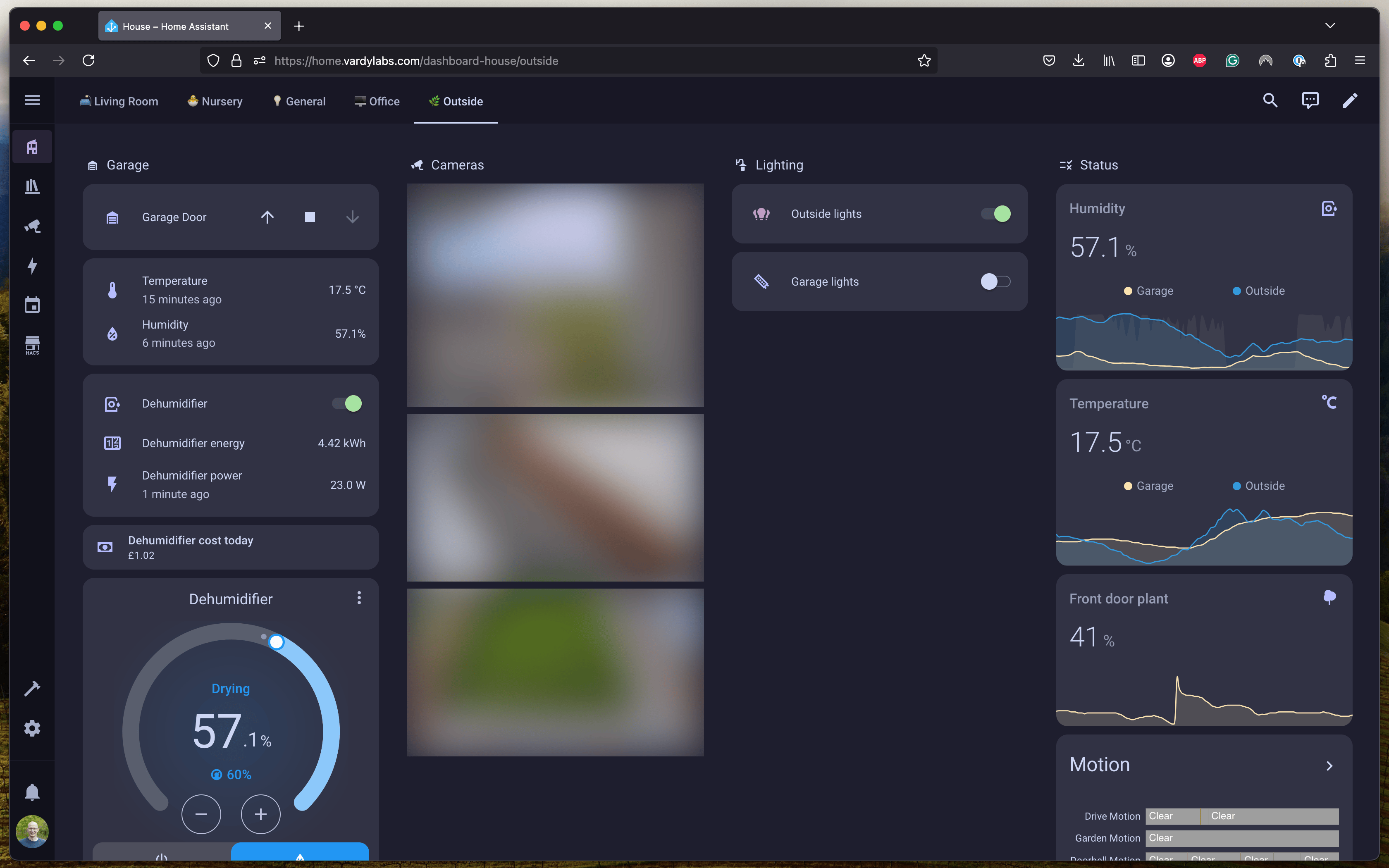
I've got a lot of dashboards that I use to check in on things, but the Living Room dashboard is the main one we use as a family. It allows us to remotely control our TV, which is useful since we've found the iOS TV control app to randomly stop working from time to time.
This dashboard also has some additional controls the kids NFC reader, you can turn the feature off altogether when we don't want them to turn off something we're watching, there is also a toggle which if enabled ensures the last video has finished playing before starting a new one. In addition to this we have buttons for every card so we can override what's playing (bypassing the checks previously mentioned). This is handy when one of our kids isn't taking turns nicely so we can play the video the other child wants. We also have a play count for videos played :D
Things that aren't smart (yet)
My house alarm system isn't really smart - I can access it remotely using an app, but it's something I'd consider changing so it was integrated into Home Assistant.
Other Projects
I had created a custom weather integration for the UK Met Office using the "DataHub" API since the old API had been deprecated breaking the core Met Office integration. However before I got this published on HACS the core Met Office integration was updated to support the new API so I won't be pursuing this.
Bloopers
If you've read this far you might be interested to hear about a few of the times thing didn't quite go to plan
- When my wife was in the office the light would constantly turn on and off because I'd only set it up to detect presence at my desk (upgraded to a proper presence sensor which can see both desks)
- My wife was getting spammed during a doctors appointment because the washing needs to go into the dryer (solved this by only notifying our devices if we're home)
- The first automation for the lights in the kitchen and dining room weren't setup perfectly. If motion was detected in either room it would set the brightness to 25% for 5mins. However one evening my wife was doing some crafts on the dining room table, so she's turned the lights up to 100% - however every time motion was detected in either the dining room or the kitchen the lights would go back to 25%
- The multitude of times I was fiddling with things, turning lights on and off or stopping the bedtime music in the kids nursery, fortunately not too many incidents, but when the kids are sleeping with the lights on low and the music quiet - that's not the time to try upgrading the Unifi network, killing the whole network causing everything to stop with no way to start it again